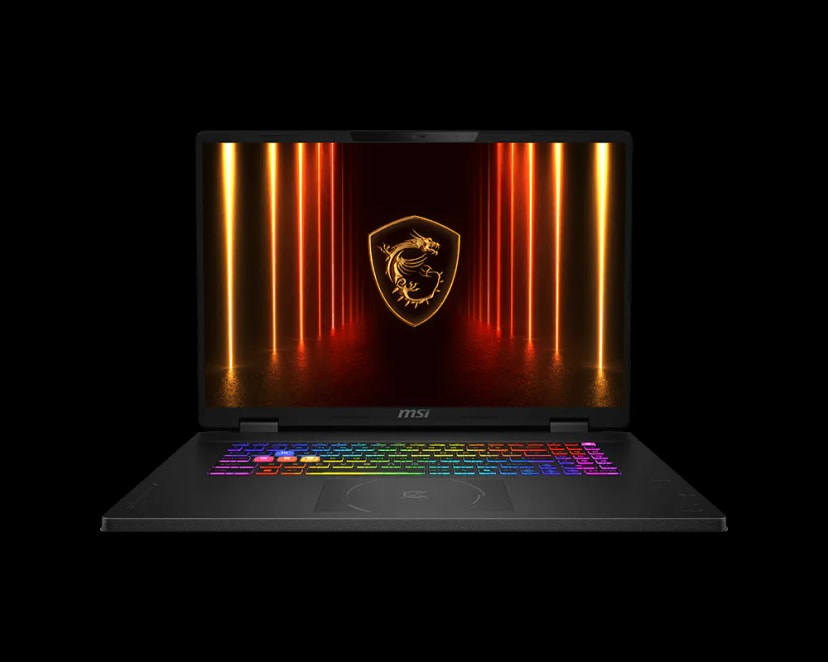
MSI Crosshair 18 HX AI A2XWGKG Gaming Laptop - Cosmos Gray
MSI
Description
• Intel Core Ultra 9 285HX • NVIDIA GeForce RTX 5070 • 32GB DDR5-6400 RAM • 1TB PCIe 4.0 NVMe M.2 SSD • 18" QHD+ (2560x1600), 240Hz Display • 170W Total CPU-GPU Power (MSI OverBoost)
FULL DESCRIPTION
For serious esports players in Riyadh or Dubai, the MSI Crosshair 18 HX AI is built to feel like a true gaming command center—big screen, high refresh rate, and the power to stay smooth when the match gets intense.
Jump into Warzone, lock in for ranked Valorant, or grind the latest AAA releases with confidence. The combination of the Intel® Core™ Ultra 9 285HX and NVIDIA® GeForce RTX™ 5070 delivers fast, stable performance for high-FPS gameplay and responsive aiming. The large 18-inch 240Hz display makes motion look clean and sharp, helping you track enemies and react faster. With DDR5 memory, loading, multitasking, and switching between games, Discord, and streaming tools feels quick and effortless.
This laptop isn’t just powerful on paper—the 170W combined CPU-GPU power helps keep performance consistent in real gameplay, even during heavy action scenes and long sessions. The 8GB GDDR7 VRAM supports modern game engines with smoother texture handling and fewer slowdowns when visuals get demanding.
Made for the Middle East lifestyle, the Crosshair 18 HX AI includes advanced thermal design to help maintain strong clock speeds and stable FPS—even when you’re gaming for hours in warmer conditions.
Need more space for new titles? With an extra M.2 SSD slot that supports PCIe Gen5, you can expand storage and keep game load times fast—so your setup stays future-ready for the next wave of releases.
SPECIFICATIONS
FREQUENTLY ASKED QUESTIONS
Will using this high-performance laptop in the hot GCC climate lead to thermal throttling or battery swelling?
Does the keyboard come with factory-engraved Arabic keys, or will I have to use stickers?
If I upgrade the RAM or add an SSD myself, will it void my warranty in the region?
Is the warranty valid if I buy this in the UAE but need support while working in KSA or Qatar?
What is the policy for dead pixels on this 18-inch display in the GCC region?
Does the power adapter provided support the local 220V/240V electricity standard, or do I need an external converter?
Frequently Bought Together
Similar Products
Free PC building tools
Plan your build with our free calculators — live prices from our UAE catalog.